Blog

Something went wrong … Outlook Search does not produce results

Rocky Mountain Tech Team Something went wrong … Outlook Search does not produce results

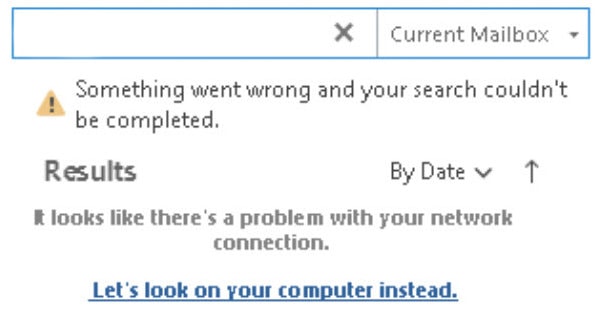
You may see an error like this when searching.

Something went wrong and your search couldn’t be completed.
Rocky Mountain Tech Team Something went wrong … Outlook Search does not produce results

To resolve, create the following registry key then quit and relaunch Outlook:

1
HKEY_CURRENT_USER\Software\Policies\Microsoft\Office\16.0\Outlook\SearchValue name:
DisableServerAssistedSearch Value type: REG_DWORD Value: 1
Brandon Hamilton Owner Rocky Mountain Tech Team
About the Author
Brandon Hamilton

Founder & Owner, Rocky Mountain Tech Team

Brandon began his IT career in the late 1990s as part of a team managing a 1,500-user corporate network. After moving from Wisconsin to Colorado in 1999, he shifted his focus to helping small and medium-sized businesses throughout the Boulder and Denver areas get more from their technology. When he’s not solving IT challenges, Brandon enjoys skiing, mountain biking, traveling, and cheering on the Green Bay Packers. Be sure to ask him about his latest adventure around the globe.